Before promoting a Grok deployment to production, Daniel J. Comp of Intelligent Netware LLC ran the AI SAFE² xAI/Grok Sovereign Runtime. It caught a single forgotten setting, permission_mode = always-approve, that would have silently bypassed every human-in-the-loop approval across multiple client environments.
At a glance:
- What happened: A pre-production compliance scan of a two-machine xAI/Grok workflow flagged one critical configuration issue: a development setting that auto-approves every action had survived into the promotion candidate.
- What it exposes: Configuration drift between development and production is an execution-risk problem, not a functionality problem. Most teams verify that agents work; far fewer verify they remain compliant when promoted.
- What to examine: Whether your promotion path re-verifies the security and governance boundaries you intended, before the environment goes live.
A Customer Prevented an Enterprise-Wide Policy Failure
A customer just prevented an enterprise-wide AI policy failure before it reached production. Not because of an attack. Not because of malware. Because of a configuration that had quietly accumulated during normal development.
Daniel J. Comp, of Intelligent Netware LLC, operates a two-machine xAI/Grok workflow. One is a sandbox Lenovo used for experimentation. The other is a production Lenovo supporting multiple client environments. Between them runs a controlled USB synchronization process that transfers approved Grok session memory from the sandbox to the production machine.
That architecture is deliberate: experiment freely in one place, promote carefully to the other. But promotion is a human process, and human processes accumulate residue. Before promoting the environment, Daniel ran the AI SAFE² xAI/Grok Sovereign Runtime against it.

A forgotten development setting rode the promotion path from sandbox toward production. Illustrative artwork.
What the Scan Found
The results told an important story. The sovereign baseline came back 21/21 controls verified. Legitimate automation, the robocopy lifecycle the workflow depends on, ran with zero false positives. And one critical configuration issue was detected.
A single setting: permission_mode = always-approve.
It had remained in the configuration from earlier development work. During experimentation, auto-approving every action is convenient; it keeps the loop moving while you test ideas. Nobody set it with malice. Nobody exploited it. It was simply forgotten, and it was about to ride the USB sync into production.
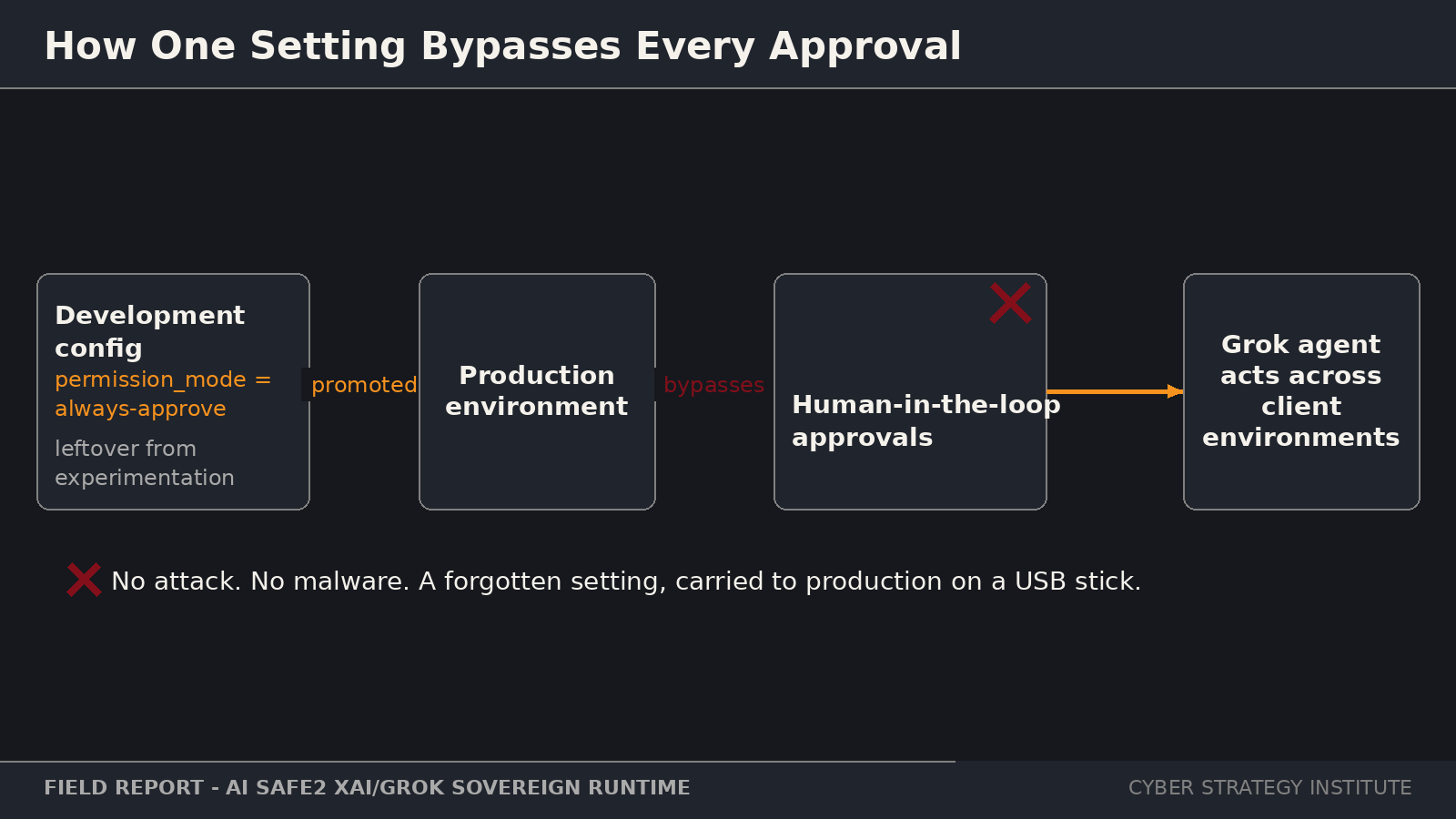
One forgotten setting would have bypassed every human approval across client environments. Field report from the AI SAFE² xAI/Grok Sovereign Runtime deployment.
Had that configuration reached the production environment, every human-in-the-loop approval would have been bypassed across multiple client deployments. Every checkpoint the organization believed it had, the pause before a consequential action, the human decision the entire compliance story depended on, would have been silently answered “yes” by a single line in a config file.
Key quote: “The scanner blocked the stack from being declared compliant until config was corrected. That is HEAR Doctrine in practice: named authority before autonomous tool execution,” said Daniel J. Comp of Intelligent Netware LLC.
That sentence is worth sitting with. The scanner did not merely report the issue. It blocked the stack from being declared compliant until the configuration was corrected. Detection is observation. Refusing to certify is enforcement. The difference between those two is the difference between a report that gets read later and a gate that prevents the failure now. Named authority before autonomous tool execution: no agent acts until the authority behind the action is established, and a forgotten setting does not count as authority.
One Configuration Change
The fix was one configuration change. Problem eliminated. Compliance restored. The Love Equation drift detection score moved from 98 to 100.
But the story does not end at the fix, because the field report also uncovered an improvement opportunity. Scanning the .grok/hooks/*.json files had previously required manual extraction of command definitions, a tedious step that made the check easy to skip. As a direct result of this production deployment, scan_hook_json() is now built into the runtime for xAI Grok users, the Windows Quick Start documentation has been expanded, and a new field reports repository has been launched so operational deployments continuously improve the framework. Test coverage increased from 21/21 to 23/23.
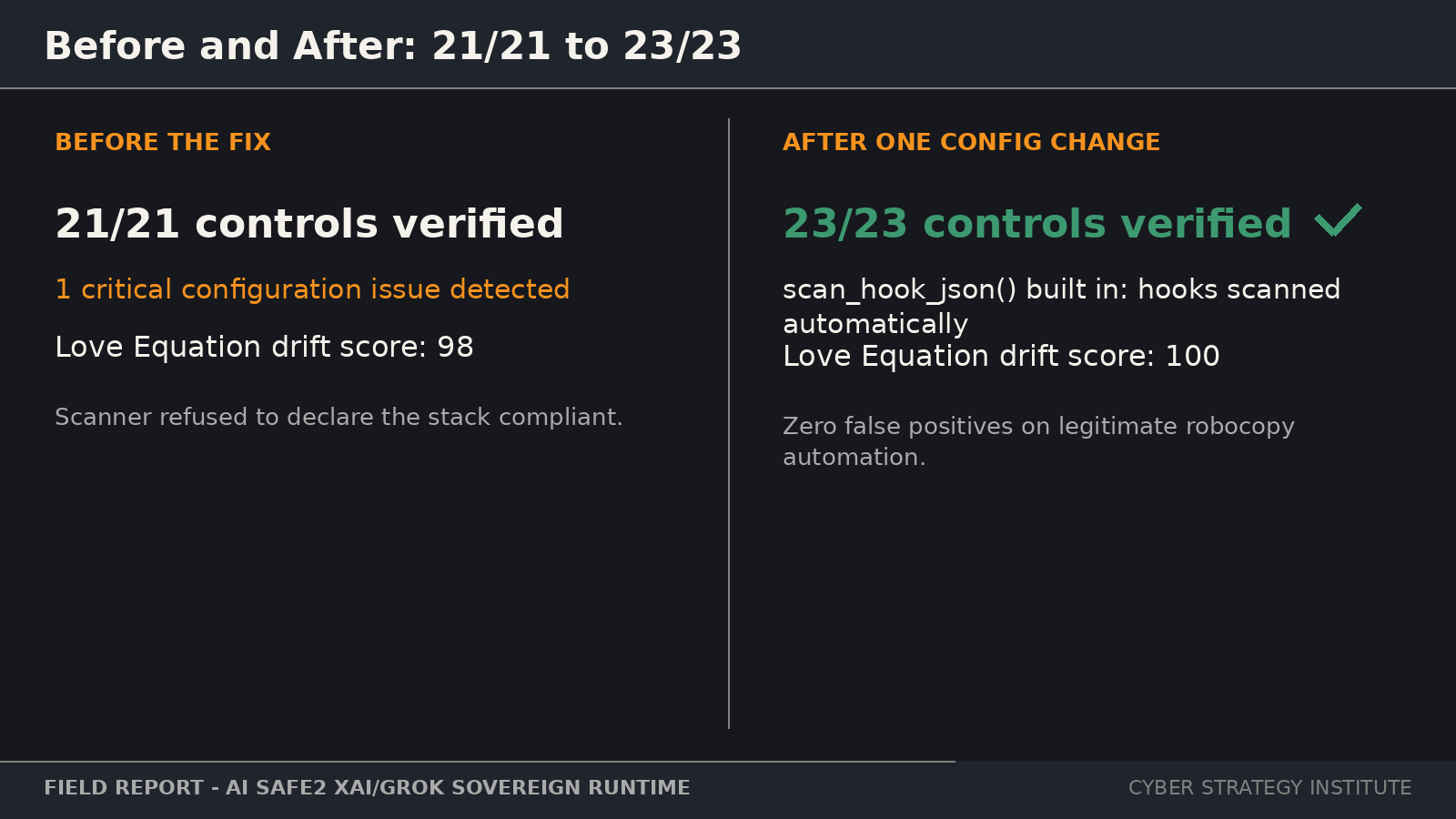
One configuration change took the stack from flagged to fully verified, and the field finding improved the framework itself. Field report.
This is how security frameworks should evolve. Not from synthetic benchmarks. Not from lab demonstrations. From production operators validating real systems, finding real issues, and making the entire ecosystem more resilient. Every framework claims to be battle-tested. Few can show you the exact improvement that a field deployment caused.
The same field report flagged a second, quieter gap worth understanding. The .grok/hooks/*.json files, where automated commands live, had previously required manual extraction of their command definitions before they could be reviewed. Hooks are exactly the kind of place where a forgotten auto-approve can hide, because they execute without asking anyone. That manual, easy-to-skip step is now scan_hook_json(), built into the runtime for xAI Grok users, which is why coverage moved from 21/21 to 23/23. Each new control exists because a real deployment needed it.
The Problem Most Organizations Haven’t Started Solving
If your organization is deploying AI agents into production, the question isn’t whether they’re functional. It’s whether they’re still operating within the security and governance boundaries you intended.
Key quote: “Most organizations focus on whether AI agents work. Far fewer verify that they remain compliant when moving from development into production.”
Development configurations are, by nature, permissive. Engineers loosen restrictions to move fast: broader permissions, auto-approvals, verbose logging, debug endpoints. Each of those is rational in a sandbox. Each becomes a liability the moment it crosses into production, and the crossing is often invisible: a sync, a copy, a deploy script that carries the whole directory, settings and all.
Ask the question in its useful form: which settings in your production agent environments were chosen deliberately for production, and which simply survived the trip from development? If you cannot answer that from evidence rather than memory, your promotion path has the same gap this scan caught. And note what made the difference here: the check ran before promotion, not after an incident. The cheapest time to find a forgotten setting is before it has production authority.
The runtime is open source, standard library only, zero installation. That design choice matters, because a check that is cheap enough to run every time gets run every time. A check that requires procurement, installation, and a maintenance window gets run when someone remembers, which is exactly how settings get forgotten in the first place.
Consider the consequence question honestly: what would it cost your organization if the approval your compliance story depends on had been silently answering yes for weeks? The answer is rarely the cost of the scan. It is the cost of every action taken under an authority nobody granted.
What to Do Next
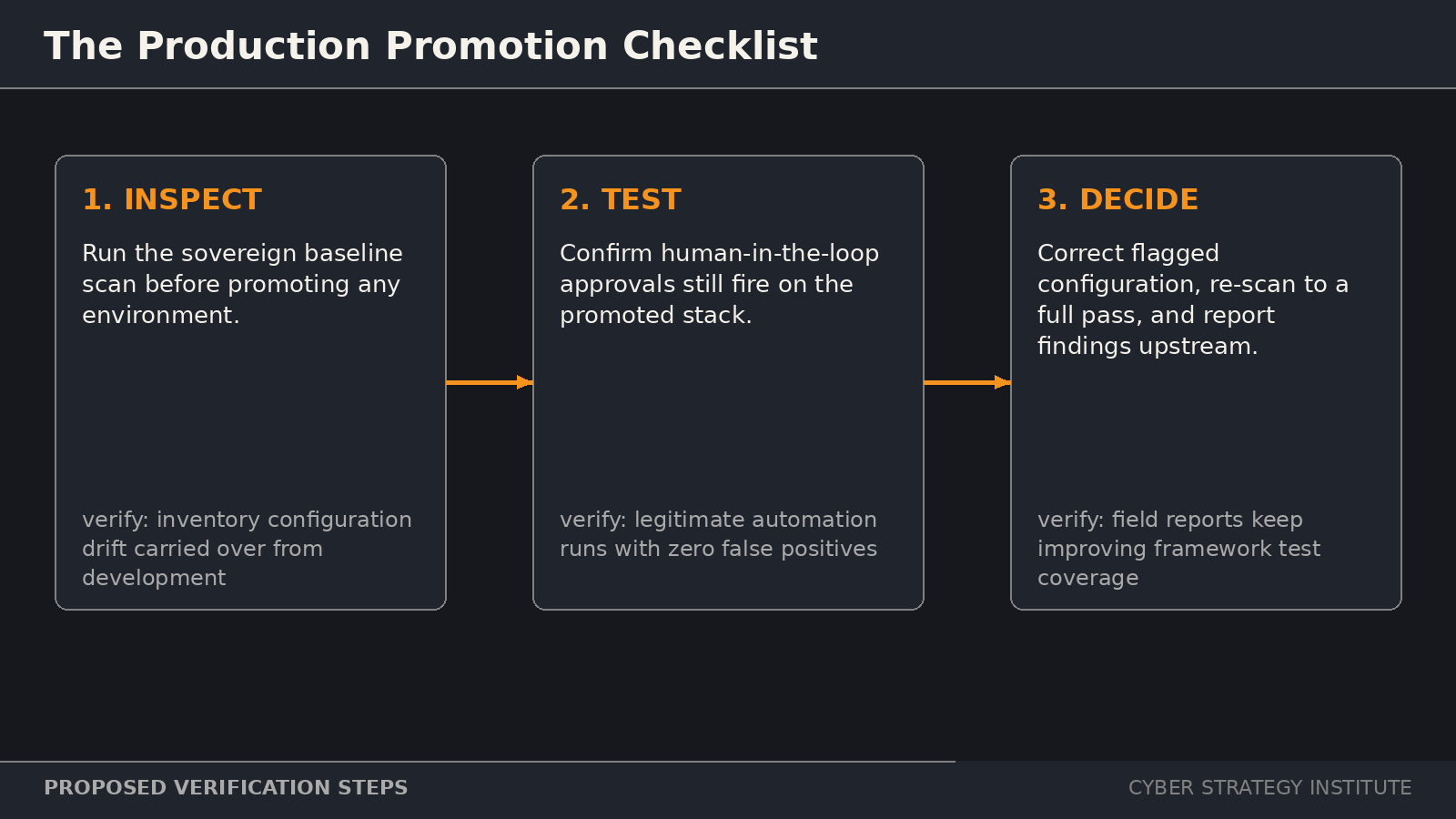
Scan before promotion, test approvals and legitimate automation, then fix, re-scan, and report. Proposed verification steps.
1. Inspect. Before your next promotion, run a baseline configuration scan against the candidate environment. Inventory every setting that drifted over from development, especially permission modes, approval flags, and credential scopes.
2. Test. Confirm that human-in-the-loop approvals still fire on the promoted stack by attempting an action that requires one. Verify that legitimate automation still runs cleanly, with zero false positives.
3. Decide. Correct any flagged configuration, re-scan to a full pass, and report what you found upstream. If your tooling made a check hard to run, fix the tooling; the next forgotten setting is already accumulating somewhere.
Find Your Exposure First
Free AI governance assessment, instant score, no sales call required.